Start Camera AR to show names over your camera, or Explore Sky. Confirm your shared location below.
Point toward an object
Direction —Camera altitude —
OBSERVER LOCATIONChecking saved location…
A location is required to calculate the sky above you.
Point your phone at the sky and use your camera, location and device direction to find the Sun, Moon, planets and bright stars in real time. In daylight, the tool can still show where stars and planets are geometrically located even when the blue sky hides them from your eyes.
✓ No photo upload✓ Camera stays in your browser✓ Uses calculated sky positions
POINT & IDENTIFYPoint toward an object
Move the phone slowly to align the center crosshair.
Waiting for camera and orientation sensors…
Satellite data loading…
Sky mode shows calculated positions, including objects below the geometric horizon. Camera mode shows the actual camera view. Compass alignment varies by device; hold the phone upright and use Align with a known target.
HOW IT WORKS
Calculated AR, not image guessing
The camera view is combined with your local time, observer location and phone orientation. Object labels are projected from calculated altitude and azimuth; the tool does not claim to visually recognize a planet from camera pixels.
DAYTIME MODE
The Sun and hidden sky objects
When the Sun is above the horizon it is included in the AR layer. Planets, the Moon and bright stars can also be shown at their calculated positions even when daylight makes them impossible to see with the naked eye.
SAFETY
Never stare at the Sun
Do not look directly at the Sun through binoculars, a telescope or an unfiltered camera attachment. The AR marker is a direction guide, not permission to observe the Sun without proper solar safety equipment.
Target alignment guide
Choose a target in the camera finder to see its direction here.
NASA SOLAR DYNAMICS OBSERVATORY
The Sun right now
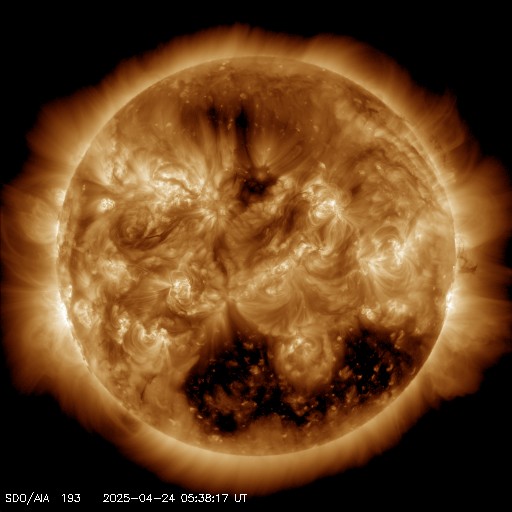
This solar image is loaded from NASA's Solar Dynamics Observatory latest-image feed. The AR tool itself uses the Sun's calculated sky position; this NASA image is provided as a current visual reference.
Live Sky AR turns your phone into a camera-based sky finder for the Sun, Moon, planets and bright stars. Instead of showing a generic star chart, the tool uses your location, current time and phone direction to place astronomical labels over the live camera view. That makes it useful both at night, when many objects can be seen directly, and during the day, when the Sun is visible but most stars and planets are hidden by scattered sunlight.
Point, identify and explore the sky
The advanced finder offers two views: Camera AR overlays labels on your live camera, while Explore Sky draws catalog stars at calculated positions. Both use the shared site location and current time. The identification card shows the nearest named target within six degrees of your pointing direction; it is a calculated candidate, not a confirmed classification of a camera image. Select a target to keep its details visible while you turn toward it.
Search includes objects above and below the geometric horizon. Below-horizon targets cannot be seen through the ground; they remain useful for understanding where an object is. The finder shows altitude and compass direction, with left/right and up/down guidance. Red night mode reduces bright interface colors. Pinch or use the zoom buttons to enlarge only the sky view; drag mode allows exploration when orientation access is unavailable.
ISS, Tiangong and Hubble are supported when current orbital elements load from the existing satellite service. Records older than seven days are omitted. A calculated satellite position is not a promise that it is visible: sunlight, local darkness, weather and apparent brightness matter. Use ISS Visible Tonight for pass planning. The field-of-view setting can improve camera alignment, and Align Target adjusts heading after you center a known object.
What is Live Sky AR?
Live Sky AR is an augmented-reality astronomy tool designed to answer a simple question: what is in the direction I am pointing my phone? After you allow location, camera and device-orientation access, the page calculates the altitude and azimuth of major Solar System objects and a curated set of bright stars. It then compares those coordinates with the direction of the phone and draws labels inside the camera view. If Jupiter is off to the right, for example, the finder can guide you toward it; when the phone points close to Jupiter's calculated direction, its label moves toward the center crosshair.
How to use the live sky camera
Start by confirming the observer location shown above the camera tool. You can reuse a location already saved by other SpaceTracker.live sky tools, tap Use My Location, or search for a city, town or village. Next, tap Start Live AR and allow camera and motion/orientation permissions. Hold the phone in portrait orientation and rotate slowly. The direction readout shows the approximate compass heading and the camera-altitude readout estimates how far above the horizon the phone is pointing. Use the object filters to simplify the display, or select a specific target from the Find Target list.
Match the camera to the real sky. This is an educational diagram; current positions and times appear in the live tool above.
Does the AR sky finder work in daytime?
Yes. Daytime operation is an important part of this tool. The Sun is calculated just like the Moon and planets, so when it is above your local horizon the AR layer can show its direction. Bright stars and planets do not disappear in daytime; they remain in the sky but the atmosphere scatters sunlight and usually overwhelms their contrast. Live Sky AR can therefore show a virtual position for an object even when your eyes cannot see it. This is useful for learning how the daytime and nighttime sky connect, but it should not be interpreted as proof that an object is optically visible through the camera.
Finding planets with your phone
Mercury, Venus, Mars, Jupiter and Saturn are common naked-eye planet targets, while Uranus and Neptune usually require optical aid. Their visibility changes continuously because Earth and the planets move around the Sun. The AR finder calculates where each planet is relative to your local horizon at the current time. For a more detailed observing plan—including rise, set, altitude and best viewing time—open Planets Visible Tonight. If you are trying to identify a bright object close to the Moon, use What Planet Is Near the Moon Tonight?.
Finding stars and constellations in AR
The star layer focuses on bright named stars so the screen remains readable on a phone. When a star is above the horizon, its calculated position can appear in the camera overlay. The constellation layer uses representative anchor positions to help you orient yourself rather than pretending that a phone camera has automatically recognized an official constellation boundary. For a wider whole-sky chart with constellation guides, use Constellations Visible Tonight or the Night Sky Tonight map.
The phone orientation places a calculated marker. This is an educational diagram; current positions and times appear in the live tool above.
Why AR alignment may not be perfect
Phone compasses and motion sensors are convenient but not laboratory instruments. Magnetic cases, vehicles, steel structures, nearby electronics and local magnetic interference can shift the heading. The phone's field of view also differs between camera models, so an AR label can be several degrees away from the real object even when the astronomical calculation is correct. If the overlay looks consistently offset, move away from metal objects, rotate the phone in a gentle figure-eight motion to help the compass recalibrate, keep the phone upright, and compare the result with a known direction such as the Sun's general position or a bright planet.
Camera privacy and permissions
The live camera is requested through your browser and is used as the background for the on-screen overlay. SpaceTracker.live does not need you to upload a photograph in order to use the finder. Modern browsers require HTTPS and an explicit user action before they grant camera, location or motion-sensor access. You can stop the camera at any time with the Close button or by leaving the page. If a permission was previously denied, open your browser's site settings and allow the required permission before trying again.
Sun safety when using Live Sky AR
The daytime Sun marker is useful for orientation, but solar observing requires special care. Never look directly at the Sun through binoculars, a telescope, camera telephoto optics or any magnifying optical device unless it has a properly certified solar filter installed in the correct position. A phone screen does not make direct solar viewing safe. For solar context, the page displays an image from NASA's Solar Dynamics Observatory, while SpaceTracker.live's Sun Position Today tool provides dedicated altitude, azimuth and shadow-direction information.
Live Sky AR and the Sky Tonight tools
The AR camera is intended to complement, not replace, the other Sky Tonight tools. Use Meteor Shower Tonight for active meteor radiants, Best Time to Stargaze Tonight for darkness, Moon and weather conditions, ISS Visible Tonight for station passes, and Milky Way Visible Tonight for Galactic Center geometry. The AR view is most useful when you already know what target you want and need help turning toward the correct part of the real sky.
Check heading and target alignment. This is an educational diagram; current positions and times appear in the live tool above.
Calibrate the direction before chasing a faint target
Choose a recognizable bright object and compare the calculated heading with what the phone displays. Move away from metal railings or a magnetic case if the direction seems offset. The new alignment card reports the chosen target and the current direction guidance; the camera overlay continues to use the existing astronomy calculations. Night Sky Tonight offers a map for cross-checking.
A device compass can drift even when location and time are correct. Treat the crosshair as a guide and confirm an identification with the shape of the surrounding star field or the planet visibility tool.
Choose safe daytime and nighttime targets
The AR layer can mark the Sun’s calculated direction by day, but looking at the Sun through magnifying optics is unsafe without proper protection. Do not use the phone screen to justify direct solar viewing. NASA’s Sun guide supplies scientific context.
At night, bright planets and familiar stars are easier alignment references than faint comets. Keep camera permission under your control and close the view when finished. Constellations Visible Tonight provides broader patterns to verify the direction.
Frequently asked questions about the live sky camera
Can Live Sky AR identify a planet from a photo?
No. It uses calculated positions, device sensors and the camera direction. This avoids pretending that an ordinary browser camera can reliably classify every point of light from image pixels alone.
Why do I see a star label in daylight when no star is visible?
The label marks where the star is geometrically located. Daylight can hide the star from your eyes even though the star is above the horizon.
Does the tool need GPS?
It needs an observer location, but that can come from browser geolocation or a place search. A location previously saved by compatible SpaceTracker.live tools can also be reused.
Can I use Live Sky AR on desktop?
The page can load on desktop, but the full camera-direction experience is designed for phones and tablets that have rear cameras and orientation sensors.
Is this a replacement for a telescope?
No. It is a pointing and learning aid. Faint planets, stars, nebulae and galaxies may still require binoculars or a telescope, and weather and light pollution still determine what you can actually see.